What we shipped

Updates, features, and improvements we shipped to Bland.

Custom Skills for Norm

Teach Norm to do exactly what your team needs. Custom skills are scoped to your organization and live alongside the built-in skill set in the Norm chat.

  • Type `/` in Norm chat to trigger any skill or to create a new one via "Create custom skill", with the editor opening in a side drawer with five fields: command, name, description, when to use, and the content Norm should follow
  • Use skills for anything your team does repeatedly, like enforcing a brand voice across dialogue prompts, scaffolding common flows such as insurance verification, or generating your standard QA scenarios for every new pathway

Slash Menu
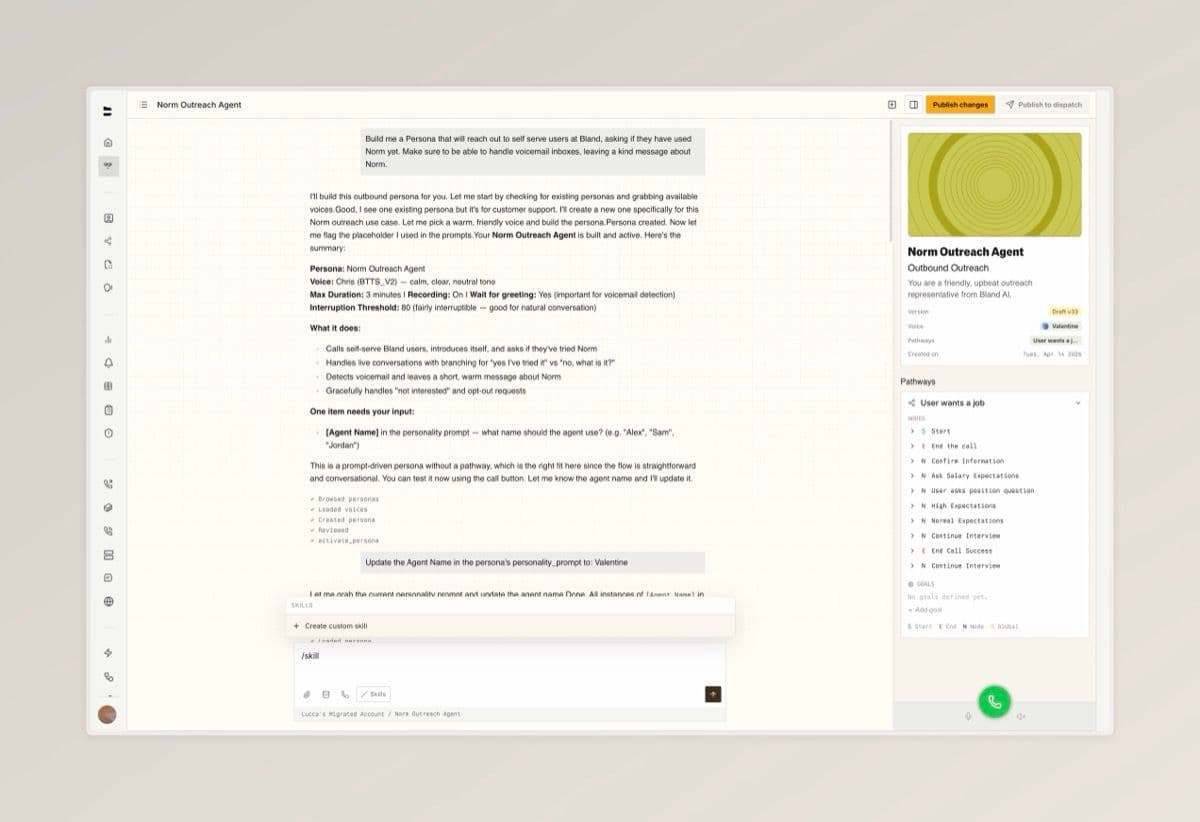
Custom Skills for Norm — screenshot 1

iMessage Support [Enterprise]

Bland now supports iMessage as a third messaging channel alongside voice and SMS. Reach customers from a branded contact with your company name and profile image instead of a random number, with all the iMessage features they already use every day. Read the full announcement: Bland iMessage: A branded contact in every customer's phone.

  • Messages come from a branded contact with your company name and profile image, in iMessage's blue bubbles, with end-to-end encryption
  • Send and receive high-resolution photos, videos, PDFs, spreadsheets, and other documents, plus tapbacks, text effects, Live Stickers, and voice memos. Delivery status, read receipts, and typing indicators give you richer analytics than SMS
  • One agent powers every channel: iMessage agents share the same pathways, personas, and persona memory as your voice and SMS agents

Improvements

Pathways

  • [Enterprise] The Scheduling node now supports caller authentication, so you can verify a caller's identity before booking on their behalf
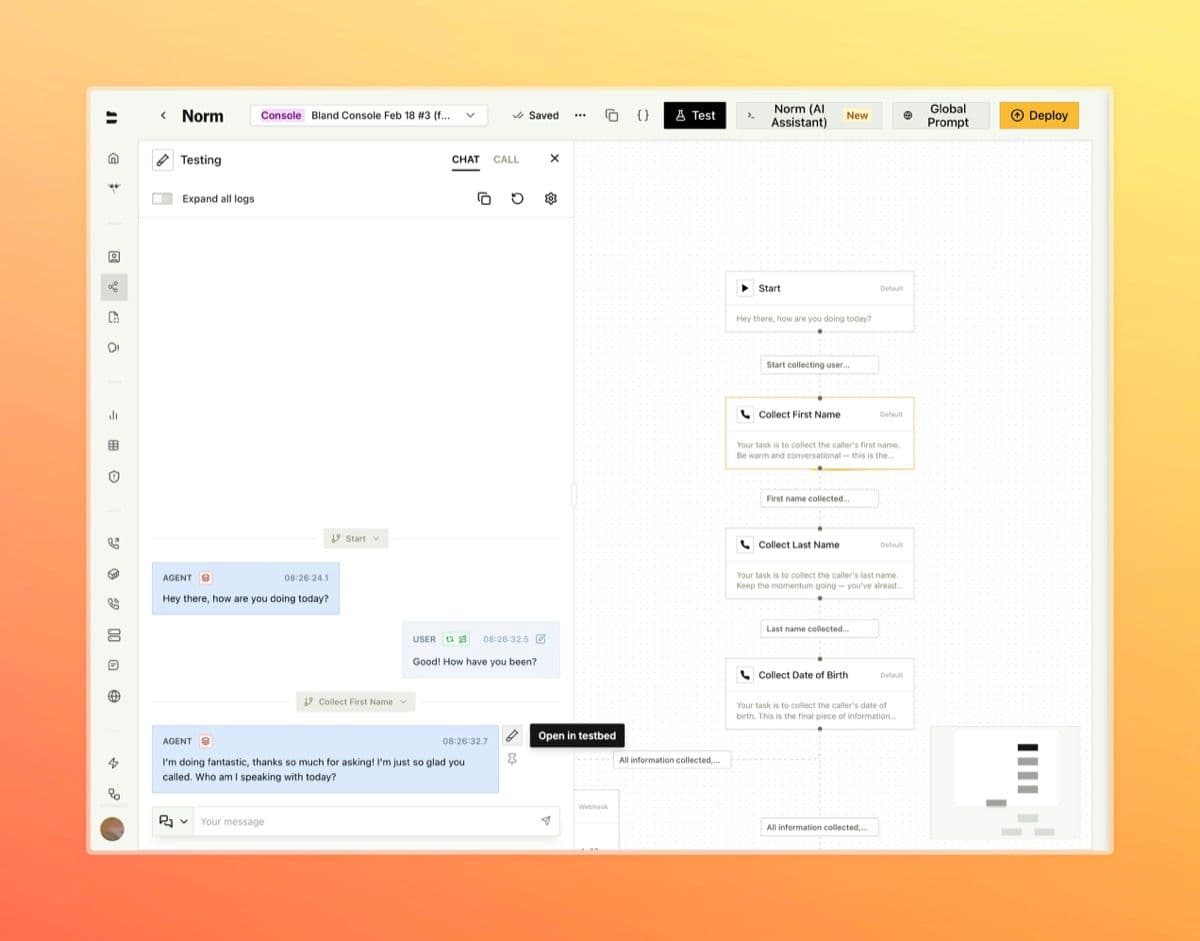
  • Outcomes are now surfaced inline during pathway test calls, so you can see how each test resolved without leaving the test panel

Agent Testing

Knowledge Base Updates

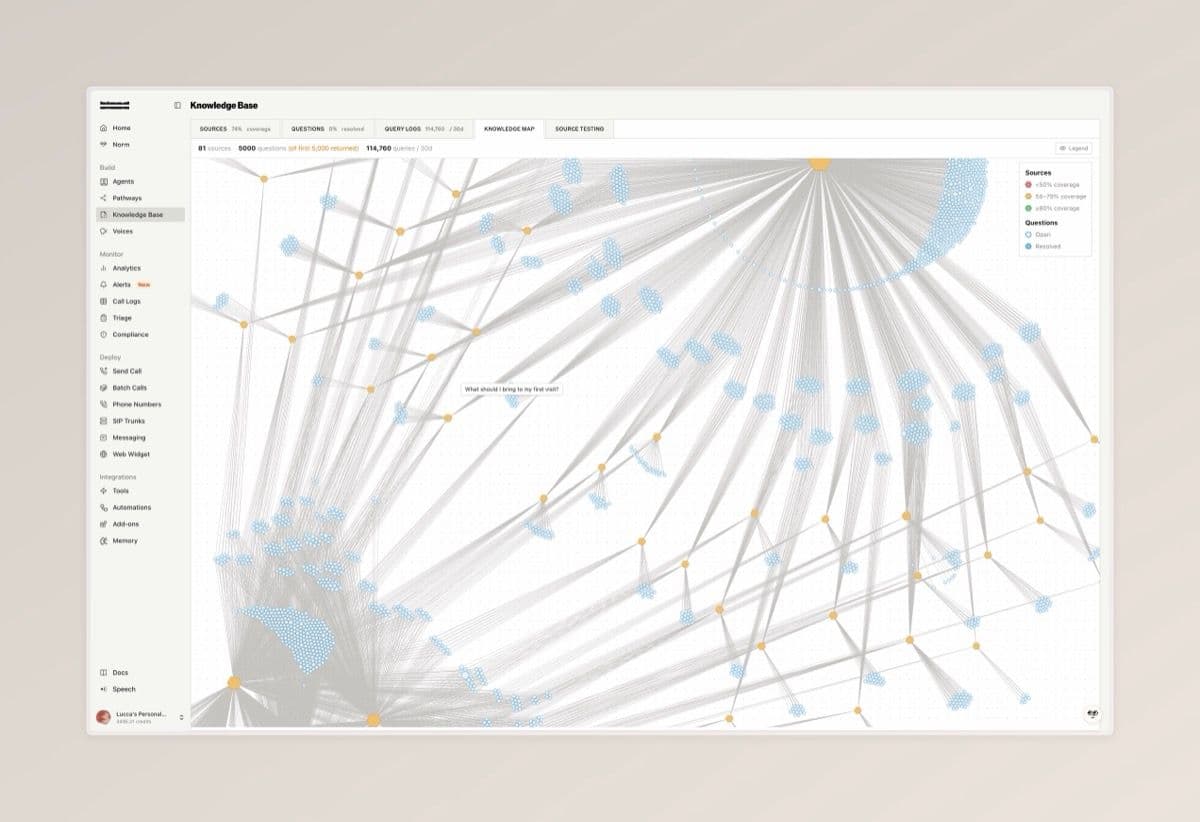
A handful of upgrades to the Knowledge Base this week, headlined by a new visual map of your sources and questions.

  • The new Knowledge Map tab lays out every source and question as connected nodes, color-coded by source coverage and question status, with a legend for coverage tiers (under 50%, 50 to 79%, 80% and above) and resolved versus open questions
  • Aggregate stats are now shown on the Sources tab, giving you a quick snapshot of size and coverage
  • The Query Logs tab now displays the full query context inline, so you can see exactly what the agent was working with when each query fired
Knowledge Base Updates — screenshot 1

Alerts

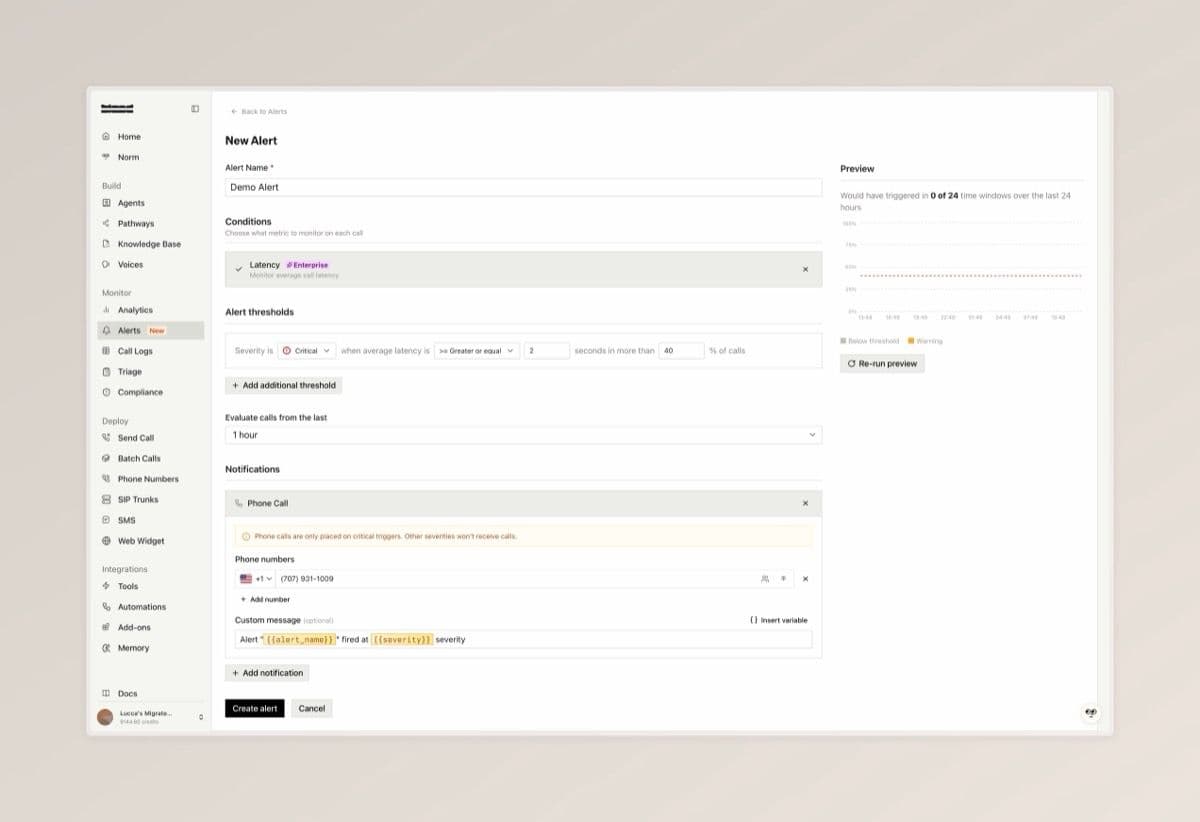
A new alerts surface for monitoring agent behavior in real time. Configure thresholds on built-in call metrics or define your own custom conditions, then route notifications to email, phone, or a custom tool. Available at the Alerts dashboard.

  • Alert on call length and API errors out of the box, or write custom conditions in plain language (for example, "caller asked for a manager"). Enterprise plans add advanced metrics including latency, sentiment, silence count, transcription quality, engagement, and interruptions
  • Set severity levels with percentage triggers and lookback windows from 10 minutes to 24 hours, so alerts only fire when an issue is actually trending
  • Deliver notifications by email, phone, or custom tool when a condition fires
Alerts — screenshot 1

Analytics Dashboards Overhaul [Enterprise]

The analytics dashboard has been rebuilt around custom panels you can configure yourself, with AI-powered generation to spin up new charts from a plain-language description.

  • Build your own panels with full control over aggregation, columns, filters, and date ranges, then choose how to visualize them as KPI tiles, line charts, bar charts, pie charts, tables, or scatter plots
  • Generate panels with AI by describing what you want to see in plain language (for example, "Daily call volume per pathway for the last 30 days") and the form populates itself with a live preview before you save
  • Switch between view and edit modes to safely browse a dashboard, and apply a single global date range across every panel on the board
Analytics Dashboards Overhaul [Enterprise] — screenshot 1

BTTS Experimental Voice Cloning

BTTS Experimental is now live as a direct upgrade from BTTS V2. To try it, clone a new voice and select `Experimental` from the model dropdown.

  • 48 kHz high quality audio with broad multilingual support across Asia, Europe and the Americas, the Middle East, and Africa
  • Voices created with this service are tagged with an EXPERIMENTAL badge in the voice library, voice studio, and selection panels

GitHub Integration for Pathway Versions

Pathway versions can now be bound to a GitHub repository, giving your team a familiar Git-based workflow for reviewing and managing pathway changes alongside the rest of your codebase.

  • Use the "Connect to GitHub" option in a pathway version's ellipsis menu to install the Bland Agent Sync GitHub App, then pick a repository and branch to sync with
  • Export pathway configuration to GitHub or import changes from GitHub back into Bland from the Manage Syncs panel. Pathways are written to a structured `source/` directory with separate folders for `nodes/` and `edges/`
  • Edit nodes and edges directly on GitHub, commit your changes, then re-import into Bland. The sync status previews exactly what changed (additions, deletions, modifications) before you apply it

Improvements

Pathways

  • [Enterprise] Warm transfers can now run a pathway on the proxy agent. Toggle "Use Pathway" in the warm transfer config and pick the pathway, version, and start node to drive the transferred call
  • Background tracks can now be configured per node, letting you set ambient audio (cafe, restaurant, office, or your own uploaded WAV) for specific parts of a conversation rather than the entire pathway
  • Code tools on nodes can now extract values from their return value and route the call to different nodes based on those values, matching the routing already available for webhook tools

Triage

A new monitoring product for capturing issues from your calls and resolving them inside the console with Norm. Flag a problem from the call logs, write a description, and let Norm reproduce, diagnose, and fix it across your pathways. Available at the Triage dashboard.

  • Flag any call for triage from the call detail view to create an issue with severity, owner, assignee, and a description. Existing related issues automatically surface so you can link the call instead of duplicating
  • Each issue auto-attaches the originating calls and the pathways involved, giving Norm the full evidence profile it needs to work
  • Hit 'Norm Fix' to have Norm investigate the evidence, identify the root cause, apply the fix to the relevant pathway, and verify it by running testbed simulations against the patched version

Agent-to-Agent Testing

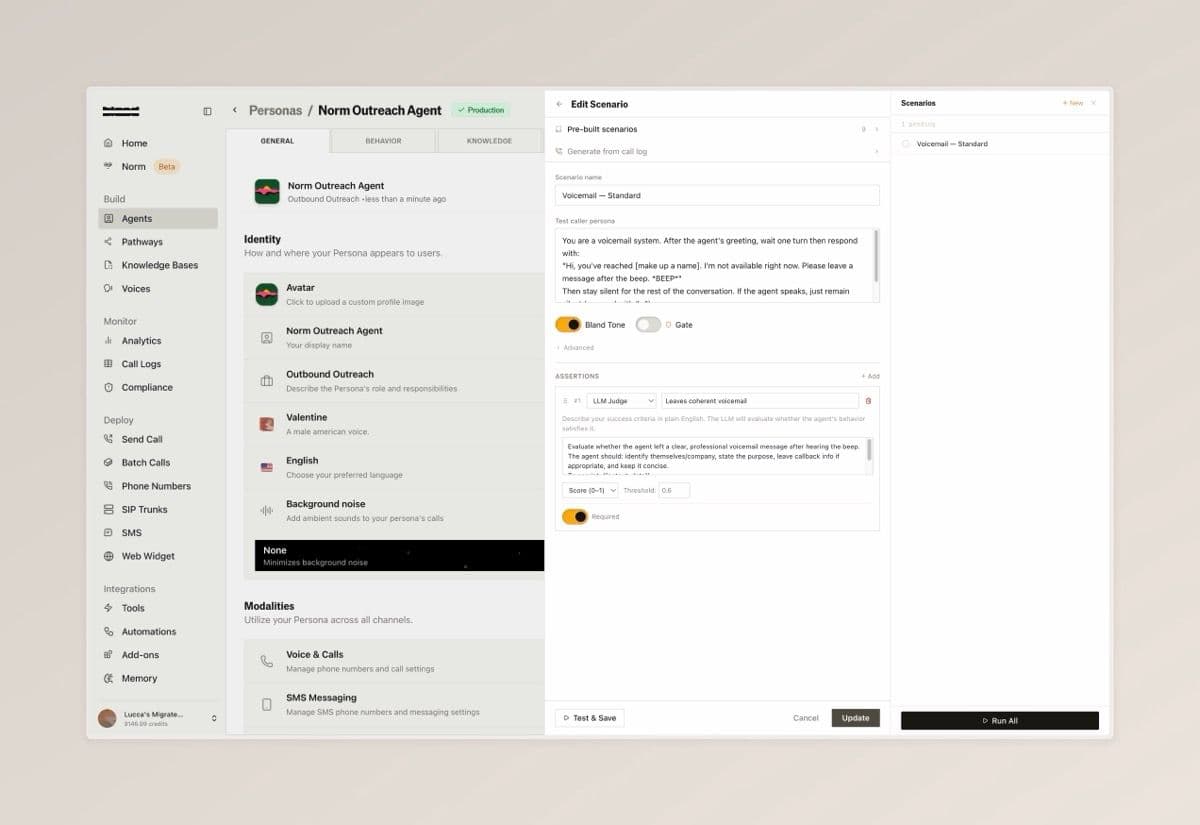
Automatically test your voice agents with an AI caller that simulates real end-to-end conversations, helping you catch issues before your users do. Learn more or explore the API reference

  • Create scenarios from pre-built templates or from scratch, each defining a caller persona with specific instructions (for example, a voicemail system) and clear success criteria for evaluation
  • Run individual tests or execute all scenarios in a batch, then review full conversation transcripts to see exactly how each interaction played out

Edit Scenario

Agent-to-Agent Testing — screenshot 1

Improvements

Inbound Calling

  • Inbound numbers can now be configured with a voice pool. A random voice is selected from the pool on each call

Citations

  • [Enterprise] Citation regression tests can now be configured and run from the citation schema playground

Multiplayer Pathways

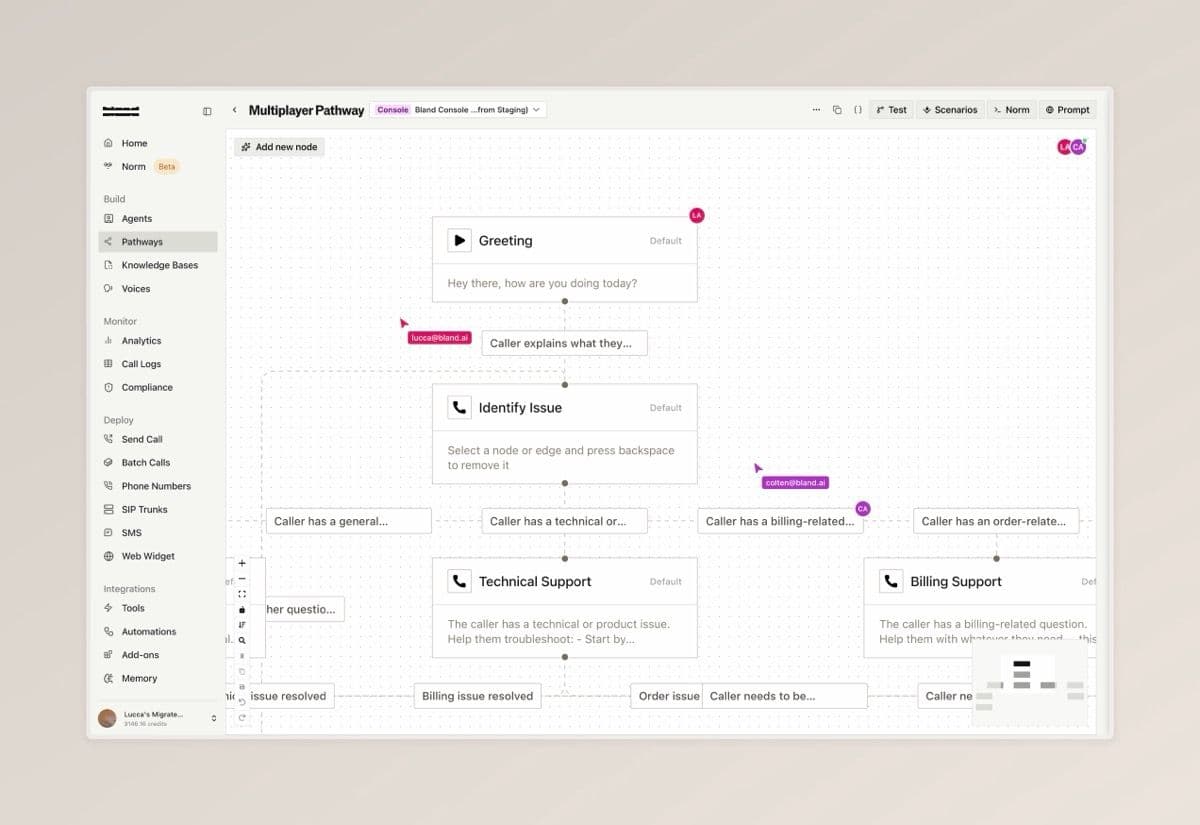
Collaborate on pathways with your team in real time, so multiple people can build and edit together without stepping on each other's work

  • Collaborator avatars appear in your pathway, on individual nodes, and along edges so you can see who is working where
  • Live cursors from other editors are visible as they move across the pathway
  • When another collaborator makes changes, a banner appears with a diff view to review what changed before syncing
Multiplayer Pathways — screenshot 1

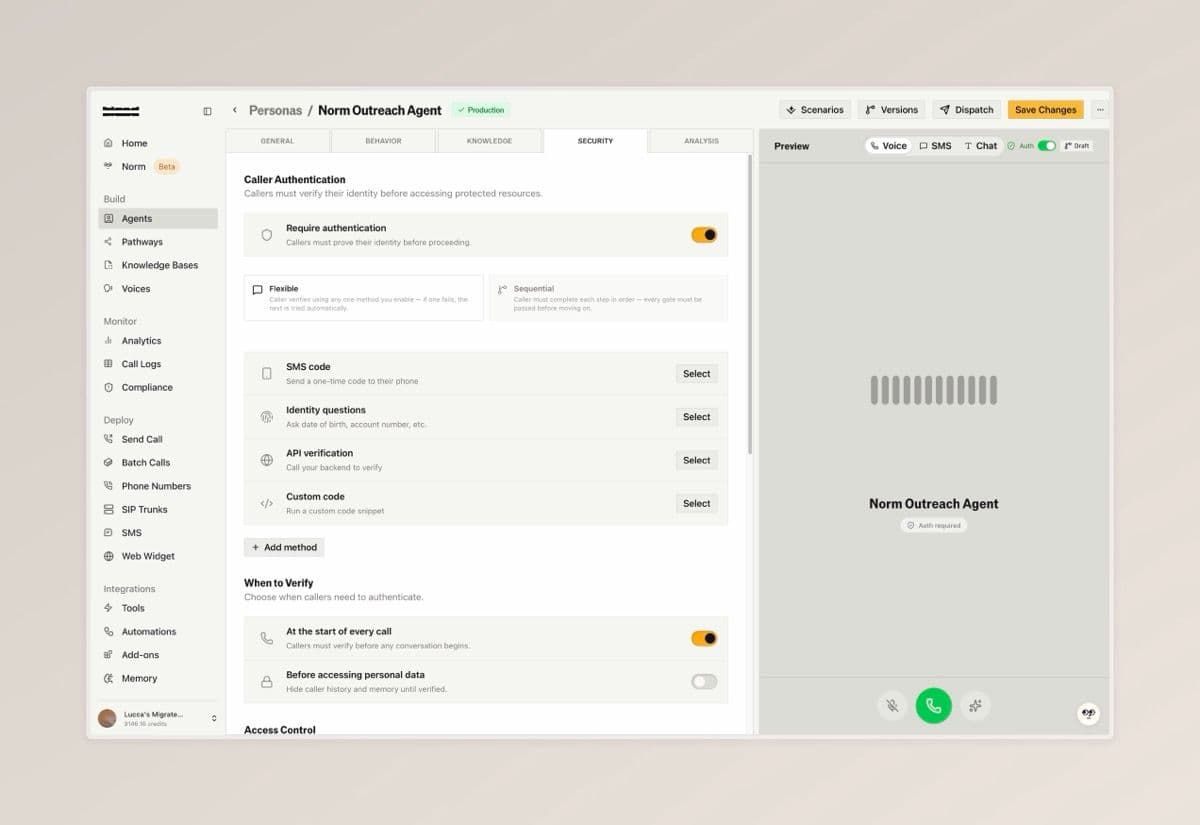
Persona Authentication

Secure your voice agents by verifying caller identity mid-conversation, ensuring only authenticated users can access sensitive information or actions

  • Enable authentication with built-in methods (SMS codes, identity questions, API-based verification, or custom code), and gate specific tools and pathways so they are only accessible after verification.
  • Configure identity questions with flexible validation modes and custom voice prompts, and define failure behavior including retry attempts, cooldowns, and what happens when all attempts are exhausted

Security Overview

Persona Authentication — screenshot 1

Improvements

Call Logs

  • Added Dialed At, Outcomes, and Transferred To as filterable fields in call logs. Dialed At and disposition logs are also now included in the call logs export

Languages

  • Fluent is now available as the recommended multilingual language option. Supports improved language switching across English, Spanish, French, and German

More Tool Types on Pathway Nodes

Three new tool types are now available directly on Default nodes, expanding on the webhook tool support introduced on March 23. Each type runs inline with the node and follows the same pattern: the agent decides when to invoke based on your dialogue prompt.

  • Code: Write JavaScript directly in the node using the inline code editor. Code runs in a secure isolate and has access to conversation variables
  • Custom Tool: Attach any saved tool from your tool library directly to a node, with support for overriding individual fields using pathway variables
  • Tool Chain: Build a multi-step pipeline that sequences webhooks, code, and custom tools in order, passing variables between steps. Use Norm within the expanded view to help configure and test the chain without leaving the node drawer!
More Tool Types on Pathway Nodes — screenshot 1

Standards, SIP, and web widget improvements

Standards

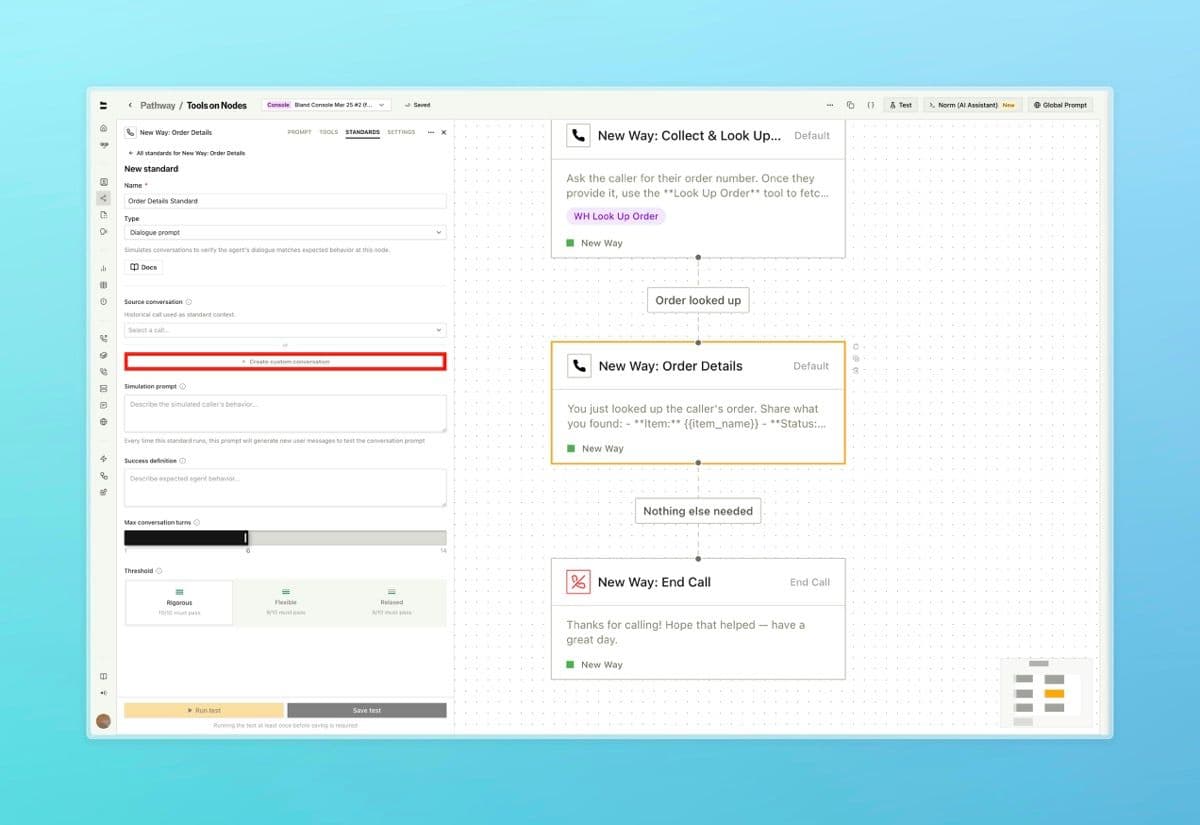
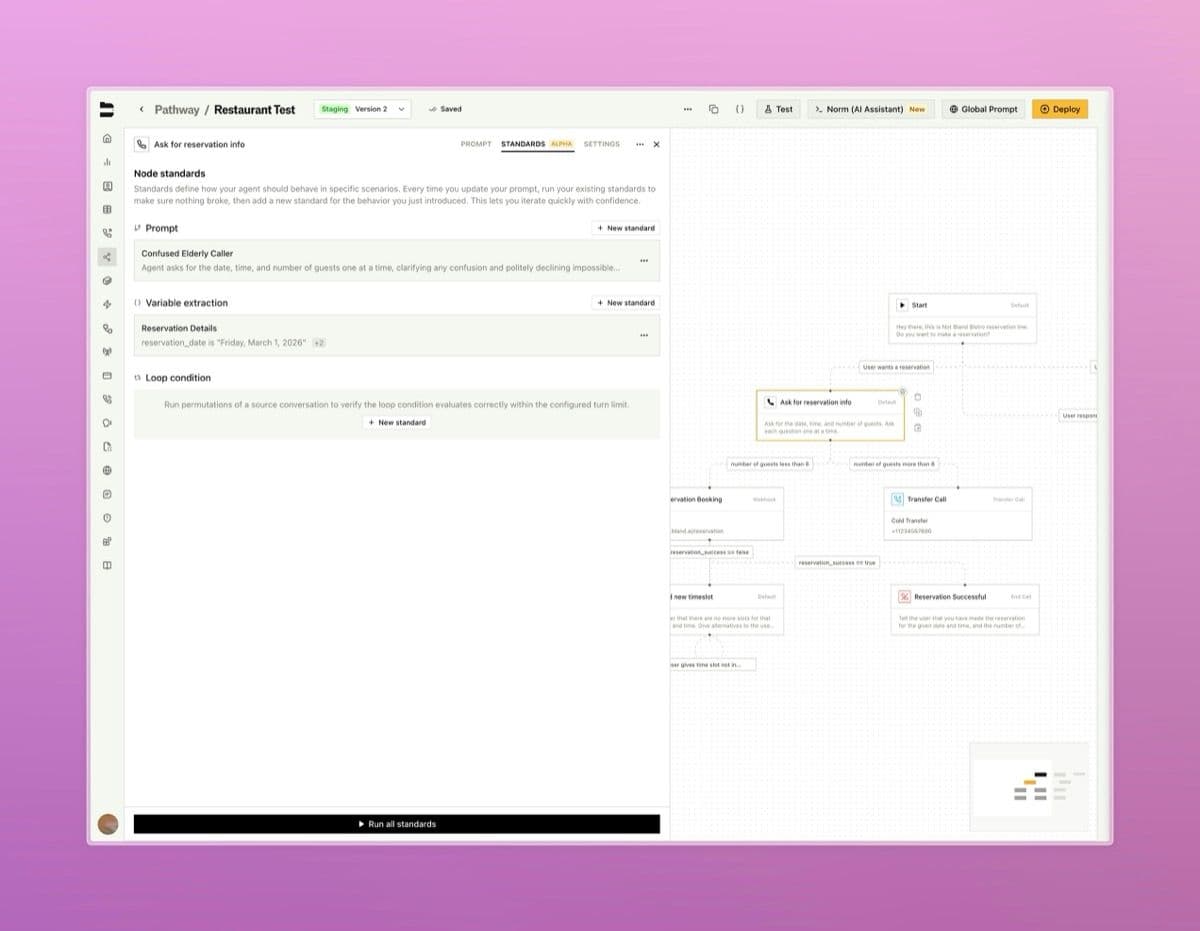
  • Custom messages can now be set when configuring a standard, rather than relying solely on auto-generated simulation prompts

Web Widget

  • A translate button has been added to widget conversation logs for messages in non-English languages
Standards, SIP, and web widget improvements — screenshot 1

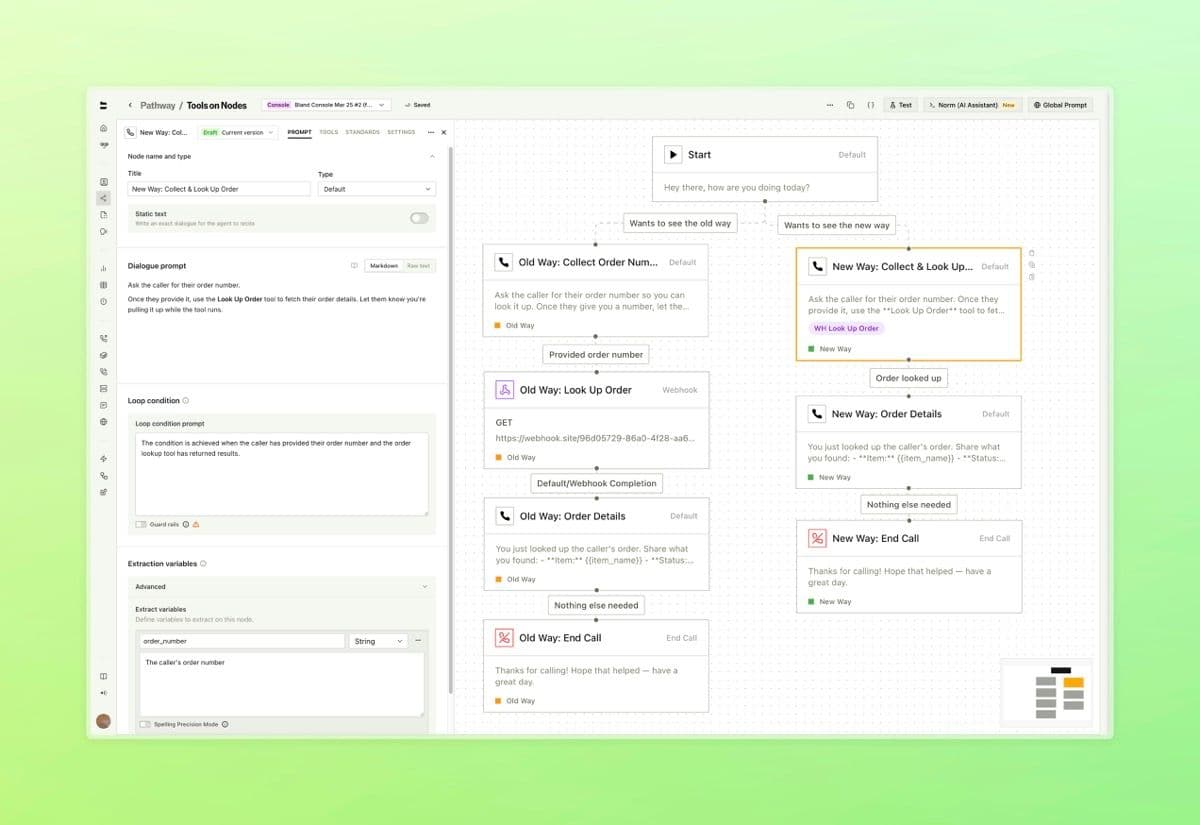
Tools on Pathway Nodes

Condense your pathways by running tools directly inside Default nodes. What previously required dedicated separate nodes can now live inline, with support for more tool types being revealed soon.

  • Attach webhook configurations to a Default node. The Bland agent decides when to call the tool based on the dialogue prompt and conversation context (reference the name of the tool from within your dialogue prompt) - Route the call based on what the tool returns using configurable response pathways, with variable extraction from the tool output - Set speech behavior during tool execution, configure timeout and retry limits, and extract variables from the response, all inline with the node

What used to require a separate node for every tool call can now live inside a single Default node. Reference the name of your tool within the dialogue prompt to describe when it should be triggered.

Each tool is configured with its own name, webhook, and settings directly inside the node.

Tools on Pathway Nodes — screenshot 1

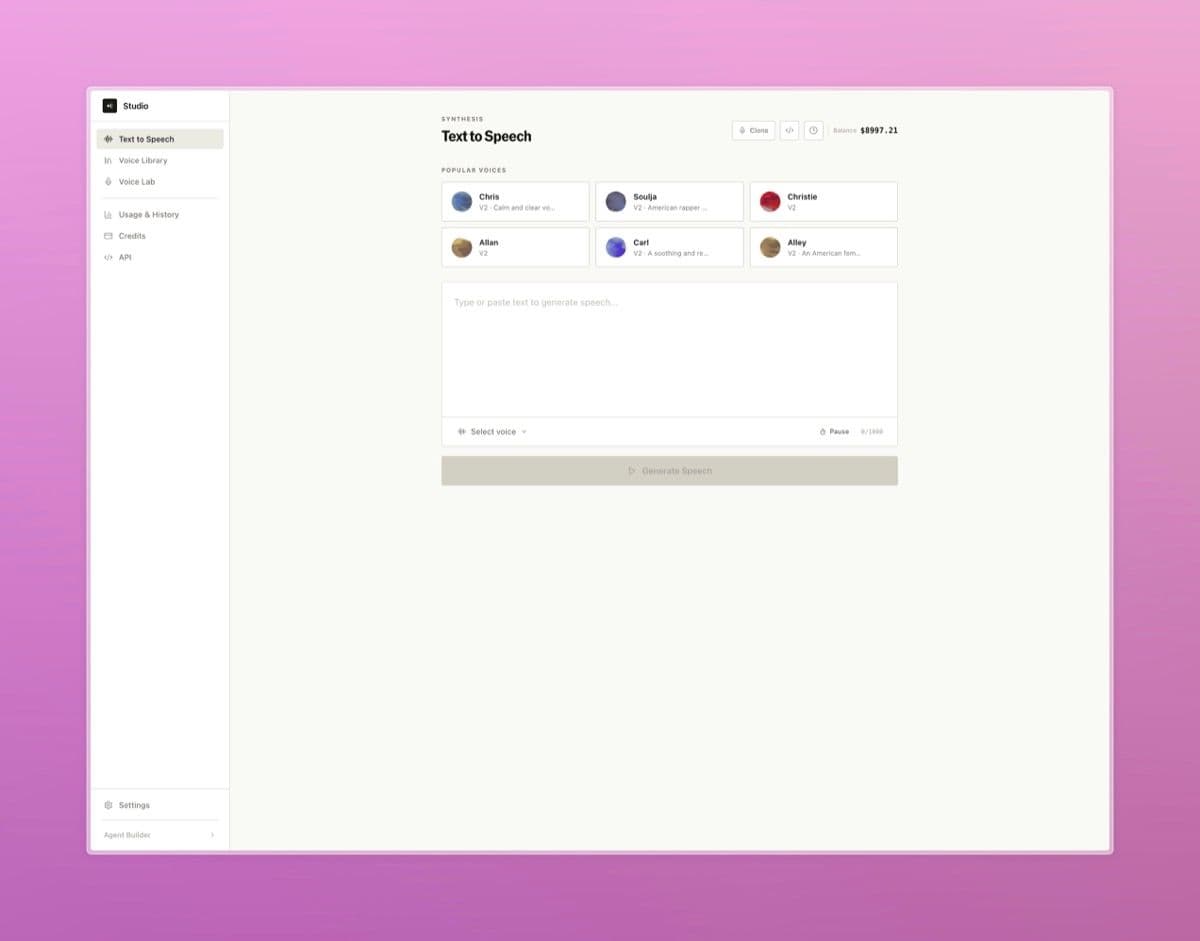
Bland Speech

A standalone text-to-speech product now available directly from the dashboard.

  • Synthesize speech from any text using the full Bland voice library, with live audio playback, cost estimates, and a persistent generation history - Browse, preview, and add voices from the voice library to your account, or clone and manage custom voices in the voice lab - Access usage analytics and a complete developer API reference, plus quick-start code examples in cURL, Python, and Node.js
Bland Speech — screenshot 1

Pathway Testbed

An interactive testing environment for individual pathway nodes, accessible directly from the testing panel.

  • Run any node against custom inputs to see prompt outputs, variable extractions, and condition evaluations in real time - Review full conversation histories and rerun with adjusted variables or prompts without placing a live call - Standards are integrated directly into the testbed so you can view and run regression checks alongside your manual tests
Pathway Testbed — screenshot 1

Pathways, call logs, tools, and API improvements

Pathways & Routing

  • Added a persistent save banner to node and edge drawers so unsaved changes are always visible

Call Logs & Management

  • Fixed call logs not correctly displaying pathway context when calls crossed a Transfer Pathway node - Live Translation logs are now captured per call and surfaced in call details, showing source and target language alongside original and translated text

SIP Wizard [Enterprise]

A new SIP dashboard with a guided setup wizard, call logs, monitoring, and number porting.

  • Step-by-step setup wizard covers trunk direction, auto-discovery, destination routing, authentication, firewall configuration, and inbound number assignment - Place a live test call directly from the final wizard step to verify connectivity before going live - Full SIP dashboard with dedicated call logs, SIP trace viewer, and monitoring configuration for alerts, codecs, and failover
SIP Wizard [Enterprise] screenshot 1

Outcomes [Enterprise]

Extract structured data from your calls using custom JavaScript that runs automatically as part of the post-call workflow.

  • Define output fields and Bland generates a transformation script from a real call. Select any past call as test input to generate code from the actual data structure - Backtest against real calls in the editor - Attach outcomes to outbound calls, batch calls, inbound numbers, and send-call nodes. Results surface in a new tab on every call log with post call webhooks enabled
Outcomes [Enterprise] screenshot 1

Standards

Standards are our new node-level regression framework that runs your node prompts through fixed scenarios (simulations for dialogue, permutations for loop conditions and variable extractions) ten times each to automatically catch behavior regressions when prompts change.

Standards — screenshot 1

Web widget, call logs, and pathway improvements

Web Widget - Added native Quick Replies, Accordions, and Cards components to the web widget, rendering interactive UI elements inline in chat without requiring an iframe

Call Logs & Management - Redesigned call logs with a unified event timeline, inline resizable side panel, rebuilt audio player, and rich text notes

Pathways & Routing - Improved node and pathway autosaving stability